How to Turn One Long-Form Video Into Weeks of Content
 Uliana Glagoleva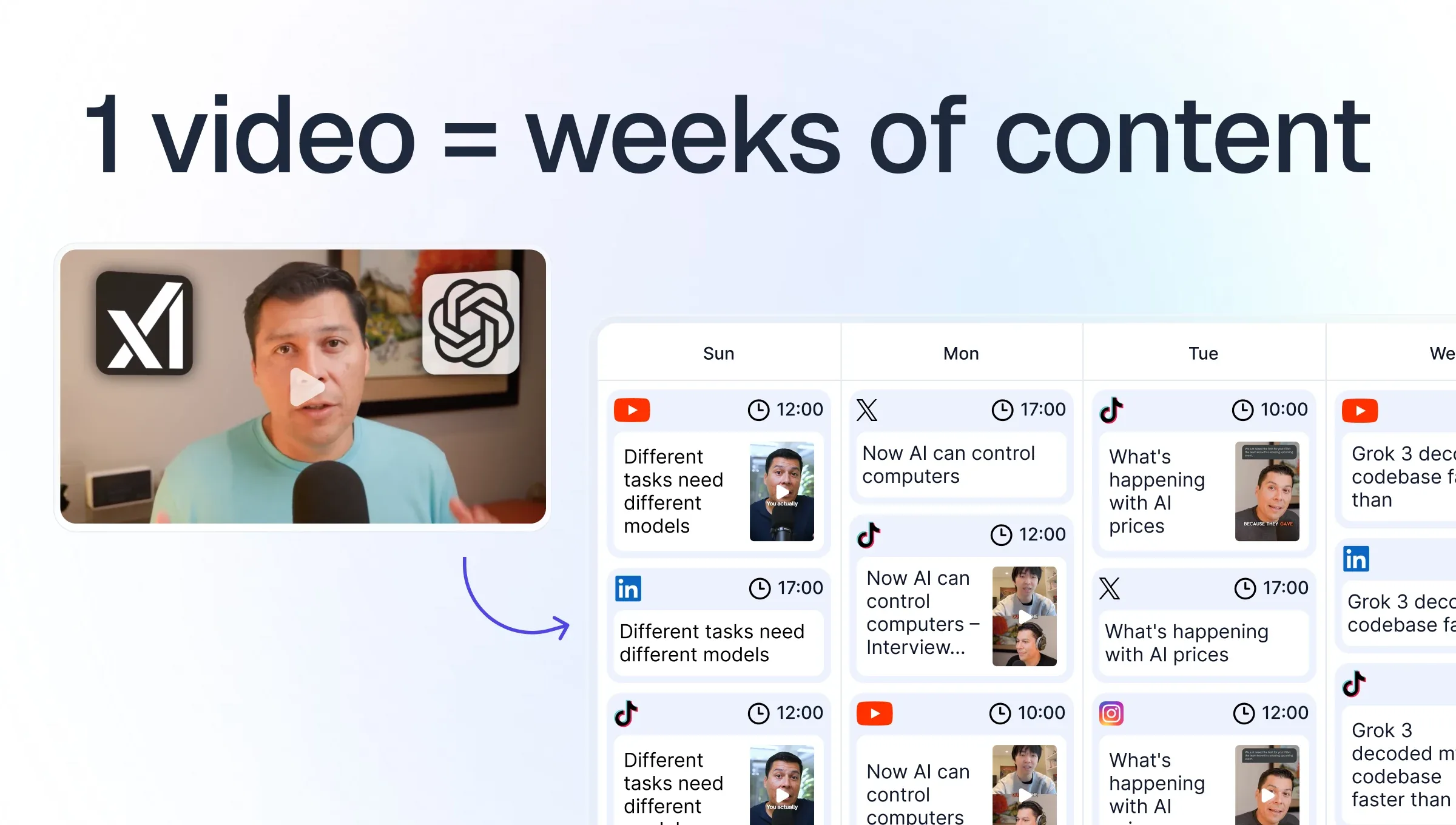
A 40-minute video can easily give you enough material to post for the next two or three weeks. The difficult part is figuring out what to do with all of it.
And this isn't limited to making a few clips. In Kaltura's 2025 survey of 600 marketers, 41% said they turn long-form content into shorter clips, while another 41% repurpose video into non-video formats. Some moments work better as short videos, some deserve a LinkedIn post, some can become a carousel, and others are useful mainly because they give you an idea for what to make next.
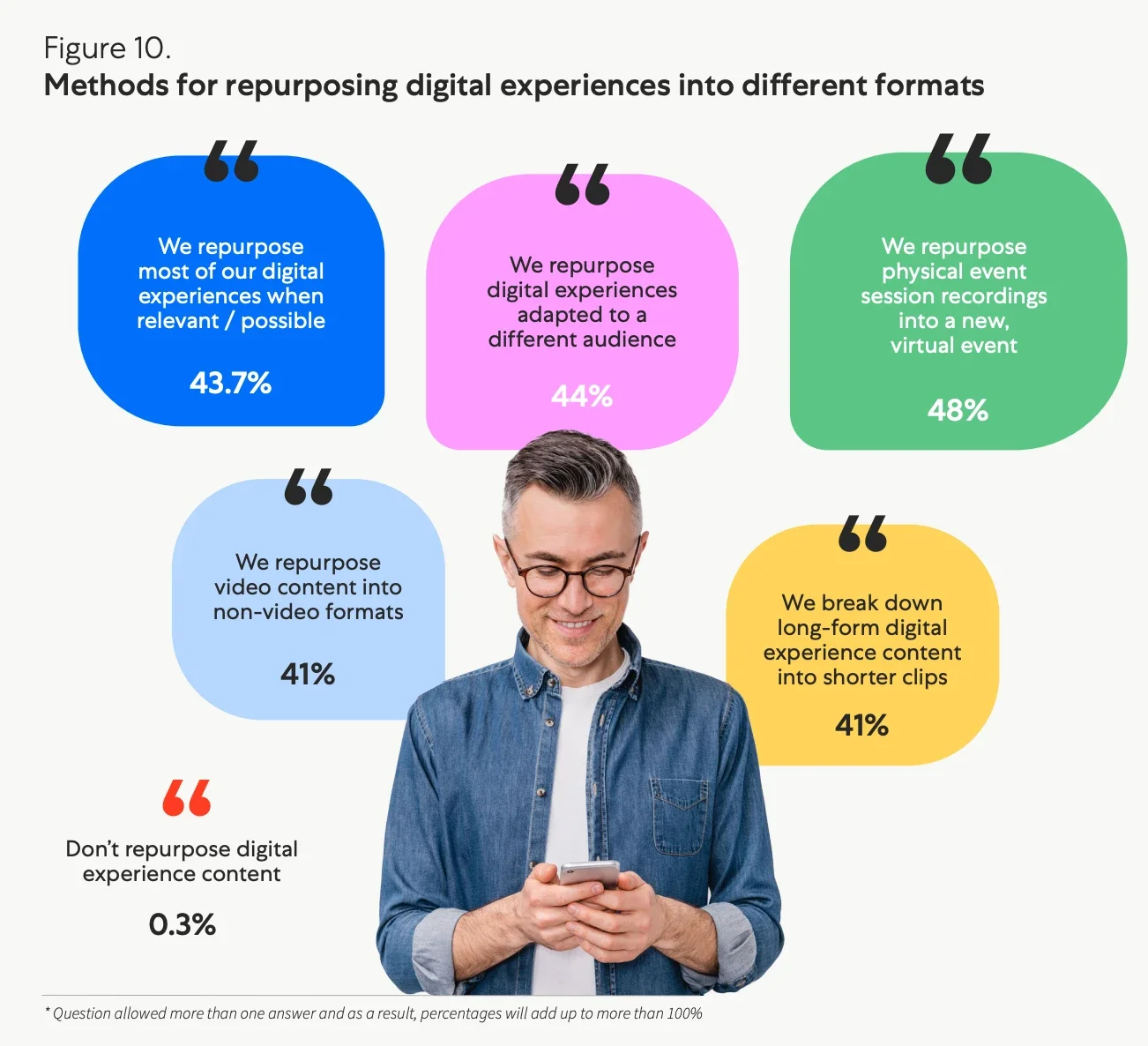
Source: Kaltura's 2025 State of Digital Experiences
So let's take one long-form video and actually build a content strategy around it.
Create a content map from your long-form videos
Before you open the editing timeline, watch the video and make a simple list of everything interesting inside it.
For an interview, that might include a personal story from the guest, three useful tips, a strong opinion, an answer that surprised you, a funny exchange and two questions you wish you'd talked about for longer. For a tutorial, it could be individual steps, common mistakes, before-and-after moments, shortcuts or questions beginners usually ask.
This gives you a content map of the video before you start deciding what should become a Reel and what should become a LinkedIn post.
Turn your video ideas into different content formats
Once you have your content map, start matching ideas to formats. A story with a good beginning and payoff probably makes sense as a clip. A list of five mistakes might be easier to understand as a carousel. A more nuanced opinion could give you enough to write a LinkedIn post. A short, slightly controversial observation might work perfectly on X. Some ideas might give you more than one option.
A useful rule here is to stop thinking in terms of pieces of footage and start thinking in terms of pieces of information.
Adapt short-form clips for each social media platform
Even your short videos don't necessarily need to be treated as one big pile of content to cross-post everywhere. YouTube Shorts, TikTok and Instagram Reels give you different contexts to work with. One moment might make sense as a useful standalone Short, while a more casual or funny part of the same conversation could feel more natural on TikTok. A visually strong moment might be the one you choose for Instagram.
You can package the same idea differently too. Maybe one version starts with the original question, while another gets straight to the strongest sentence. Sometimes the edit stays the same and you simply change the caption or surrounding context. This doesn't mean making three edits of every clip. That would quickly turn repurposing into more work than making the original video. Just don't assume every moment needs to go everywhere. Look at what you have and decide where each piece makes the most sense.
Create new content around your original video
By this point, you've mostly been working with material you already recorded. Now you can use that material to make something new. You can show something from behind the scenes, explain a decision you made while producing the video or share a part that didn't make the final cut. Comments are useful here too. If someone asks a good question under a clip, the answer can become another short video instead of disappearing into the replies.
At this point, your original video has done something more useful than simply giving you footage to cut up. It has given you new things to talk about.
Build a three-week content calendar from one video
Now you have a mixture of clips, written posts, visual content and a few new ideas. This is where you can actually turn all of it into a schedule. A simple three-week plan could look something like this:
| Monday | Wednesday | Thursday | Friday | Sunday | |
|---|---|---|---|---|---|
| Week 1 | The full video | The strongest short clip | X post or a thread | LinkedIn post | Short clip |
| Week 2 | Instagram carousel | Short clip | Community post on YouTube | Short clip | X post or a thread |
| Week 3 | Short clip | Follow-up clip answering a question | Short clip | Instagram carousel | Community post on YouTube |
You also don't have to treat every piece in this calendar as content for one platform only. A Reel can become a Short or TikTok if it works there. A LinkedIn post might also make sense as a YouTube Community post, and the same carousel could work on Instagram, LinkedIn or TikTok. Use the same content across channels when it fits, but don't cross-post just for the sake of it. A small change to the edit, caption or context can make the same idea feel much more natural on a different platform.
Stories can run alongside all of this. Share the new post, show something from behind the scenes, ask a question related to the topic or use a poll to get people involved. I wouldn't really count Stories as one of the main pieces in your content plan, they're more like the layer that keeps the conversation going between posts. That's already three weeks built around one recording, and the audience isn't seeing the same thing nine times. The more consistently you post, the more chances people have to come across your content, but five posts a week is also quite a lot for one person or a small team to keep up with. If editing all those clips is the part slowing you down, that's exactly the bit we can take off your plate at Clipwing.
Use audience feedback to plan your next content
Once the first few pieces are out, you'll have information you didn't have when you made the plan. Maybe people keep arguing about one sentence from the first clip. There's probably another post there. Maybe several people ask the same question, you can answer it. If a post creates an interesting conversation, continue it while people are interested. This is also a good way to decide which parts of the original video deserve more attention. You don't have to guess all three weeks in advance, your audience can help shape what comes next.
Build a content bank for future posts
After all of this, you will probably still have material left. An unused clip doesn't expire because you didn't publish it during launch week. A good quote can come back when the topic becomes relevant again. A question from the interview might eventually deserve a whole video of its own.
It's useful to keep a simple content bank with unused clips, post ideas, quotes, questions and possible follow-ups from every long-form video you make. After a few videos, you stop starting every week with an empty content calendar. You have a backlog of things you've already thought about, recorded or partially developed. And that makes consistency a lot easier than trying to invent five brand-new ideas every Monday.
Make one video the start of the content, not the end
The easiest way to get weeks of content from one video isn't to cut it into as many pieces as possible. Go through the ideas inside it, decide which format suits each one. Put different pieces where they make sense, add new thoughts and responses around them, and let the audience reaction influence what you publish next. By the time you're finished, the original video might be three weeks old, but the conversation around it can still be going.